Retrato IA Auto-Focus
Mejora cualquier foto con óptica DSLR profesional. Nuestro motor neuronal separa perfectamente el sujeto y renderiza un desenfoque de lente cinematográfico ajustable en tu navegador.
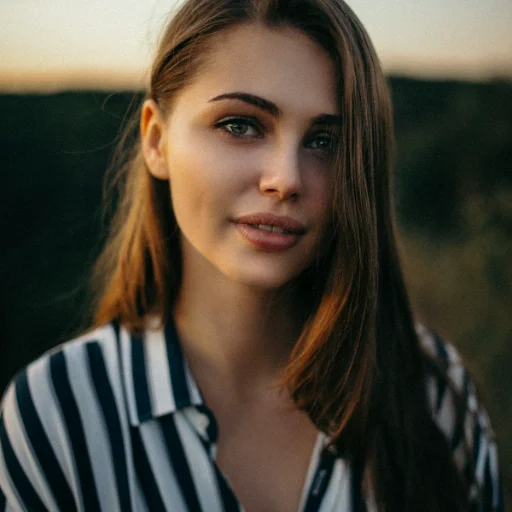
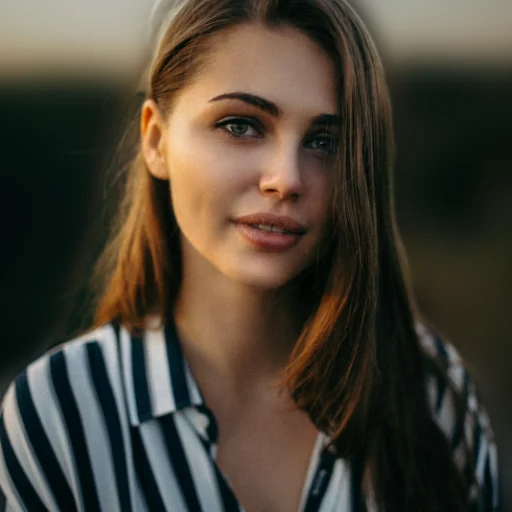
La primera vez que uses esta herramienta, tu navegador descargará el modelo de IA (unos 100 MB, que luego quedan en caché). Con datos móviles quizá prefieras usar wifi.
Cómo funciona nuestra IA centrada en la privacidad
1Cero costo de servidor
No enviamos tus imágenes a costosos servidores en la nube. Usamos WebAssembly para descargar un motor neuronal directamente en tu memoria caché.
2Segmentación del sujeto
La IA local escanea matemáticamente los píxeles en tu tarjeta gráfica y separa perfectamente los sujetos en primer plano del entorno.
3Física de profundidad de lente
Procesamos el fondo con un algoritmo gaussiano mapeado a un perfil de lente DSLR f/1.2, colocando tu sujeto perfectamente nítido encima.
What Even Is Bokeh?
You know that blurry background look in iPhone portraits? That's bokeh. The word comes from the Japanese boke (blur or haze), and it refers to the quality of the out-of-focus areas in a photo, not just that they're blurry, but how they're blurry. Good bokeh turns background lights into soft, creamy circles. Bad bokeh makes everything look like smeared vaseline. Big difference.
How Cameras Actually Do This
On a real DSLR, this effect happens naturally when you shoot with a wide-open aperture (something like f/1.4 or f/2). The physics of the lens literally can't keep both the subject and background in focus at the same time. Smartphones fake it, newer ones use dual cameras or depth sensors to guess where the subject ends and the background begins, then blur the rest in software. We do something similar, except our AI model runs right in your browser using WebAssembly. No uploads, no servers, no waiting around.
It's Not Just for Faces
Despite the name "portrait mode," this works on way more than headshots. We see people using it for product photos (blurring out a messy desk behind a product), food shots (making that ramen pop against a blurred restaurant background), pet photos, and even real estate detail shots. Basically, any time your subject is fighting a busy background for attention, a little blur goes a long way.
The Privacy Thing
Uploading your selfies to a random server understandably feels uncomfortable, and it should. Most AI photo tools ship your images off to some cloud server, process them there, and send them back. Your photos, personal shots, client work, whatever, are sitting on infrastructure you know nothing about. Maybe they delete them. Maybe they don't. You just have to trust their privacy policy.
We didn't want to build it that way. Our AI model downloads once to your browser cache (it's a WebAssembly file), and from that point on, everything runs locally, on your CPU or GPU. Your photos literally never leave your device. No upload, no server round-trip, no data collection. Period.
Cloud AI Tools
- ❌Your photos get uploaded to their servers
- ❌Stored temporarily... or who knows
- ❌Slow on bad connections
- ❌Privacy policies you never read
- ❌Usually need an account + payment
ImageFixr (On-Device)
- ✅AI runs in your browser, not ours
- ✅Photos stay on your machine. Full stop.
- ✅Works fine on slow wifi
- ✅We literally can't see your photos
- ✅Free, no signup, no strings
Frequently Asked Questions
How does the AI background blur work?
Short version: a neural network runs right in your browser (via WebAssembly), figures out what's the subject and what's the background, then applies a Gaussian blur to just the background. It's modeled after the depth-of-field you'd get from a wide-aperture DSLR lens. Nothing gets uploaded anywhere.
What kinds of photos work best?
Anything where the subject is reasonably distinct from the background. Portraits, pet photos, product shots on a table, all great. Fair warning though: if you're wearing a white shirt against a white wall, the AI will have a harder time figuring out where you end and the wall begins. More contrast = better results.
Is this as good as a real DSLR?
For Instagram, LinkedIn, or a portfolio, you won't notice a difference. A real lens does produce unique optical characteristics (the way it renders light highlights, for instance) that software can't perfectly copy. But at normal viewing sizes, especially on a phone screen, the result is very close.
Why is the first photo slow?
That first run is downloading the AI model into your browser cache, usually takes 10-20 seconds depending on your connection. After that, everything in the same session is much faster since the model is already loaded locally.
Can I control how blurry the background gets?
Absolutely. Once the AI does its thing, you get a blur radius slider. Drag it low for a subtle, natural look. Crank it up for that dramatic, everything-is-melted-away effect. Play around with it. There's no wrong answer.